
Md Redline
by
Provides inline review comments for markdown specifications, allowing AI agents to read and act on feedback directly within the markdown file.
Md Redline Overview
Md Redline
What is Md Redline about?
Md Redline enables you to highlight text in a rendered markdown document, attach invisible HTML‑based comment markers, and let AI agents consume those comments as structured prompts. The comments live inside the .md file, keeping the file as the single source of truth without side‑car files or external services.
How to use Md Redline?
- Quick start – run the CLI with
npx md-redline /path/to/spec.md. The app launches in your default browser. - Global install (optional) –
npm install -g md-redlinethen usemdr /path/to/spec.mdormdr /path/to/dir. - Register the MCP server – e.g.,
mdr mcp install(ormdr mcp install --claude-codefor Claude Code only). After registration your AI client can callmdr_request_reviewto pause execution and open the review UI. - Highlight text, add comments, click Send review, and the agent receives a formatted prompt containing all comments.
- The agent processes the feedback, edits the markdown, and removes handled comment markers. You can view changes in raw, rendered, or diff mode.
Key features of Md Redline
- Inline, invisible comment markers stored directly in markdown (JSON payload inside
<!-- @comment{...} -->). - Threaded replies with explicit
open/resolvedstates. - Multi‑tab editing, file explorer, recent files, and persistent session state.
- Real‑time file watching via Server‑Sent Events (SSE).
- Mermaid diagram rendering, local image embeds, and clickable markdown links.
- 8 built‑in themes (Light, Dark, Sepia, Nord, Solarized, GitHub, Rosé Pine, Catppuccin).
- Cross‑platform support (macOS, Linux, Windows) with native file pickers.
- Permission model that trusts the home directory by default and prompts for external folders.
- Integrated MCP server that can be invoked by Claude Code, Claude Desktop, Codex CLI, Gemini CLI, or any MCP‑compatible client.
Use cases of Md Redline
- Spec and design doc review in a local development loop where an AI assistant iteratively refines documentation.
- Prompt engineering – embed feedback directly in the markdown that defines the prompt, allowing the agent to adjust the prompt on the fly.
- Team pre‑commit review – developers run a local review before committing markdown files to a repository.
- Human‑agent editing loops – combine human insight (highlight + comment) with AI execution without copying and pasting context.
FAQ
Q: Do I need a database or external service? A: No. All comments are stored as invisible HTML markers inside the markdown file.
Q: Can multiple users edit the same file simultaneously? A: Md Redline is intended for single‑user local workflows; it does not provide collaborative editing.
Q: What if the file is outside my home directory? A: The first time you open such a file, the OS folder picker will ask for permission; the granted folder is remembered.
Q: How does the MCP server start?
A: After registration (mdr mcp install), the server is launched automatically when the CLI is invoked with the mcp subcommand.
Q: Which AI clients are supported? A: Claude Code, Claude Desktop, Codex CLI, Gemini CLI, and any other client that can communicate with an stdio MCP server.
Q: How are conflicts handled when the file changes externally? A: Md Redline uses atomic write‑then‑rename and mtime‑based conflict detection to prevent data loss.
Md Redline's README
md-redline

Inline review comments for markdown specs, prompts, and design docs.
Highlight text in a rendered document, leave comments, and your AI agent can read and address them directly. Comments are stored as invisible HTML markers in the .md file itself. No sidecar files, no database, no external service. The markdown file stays the source of truth.
With the built-in MCP server, your agent can request a review mid-task and pause until you click Send review. You leave your feedback, the agent picks up where it left off. No copy-paste, no context switching.
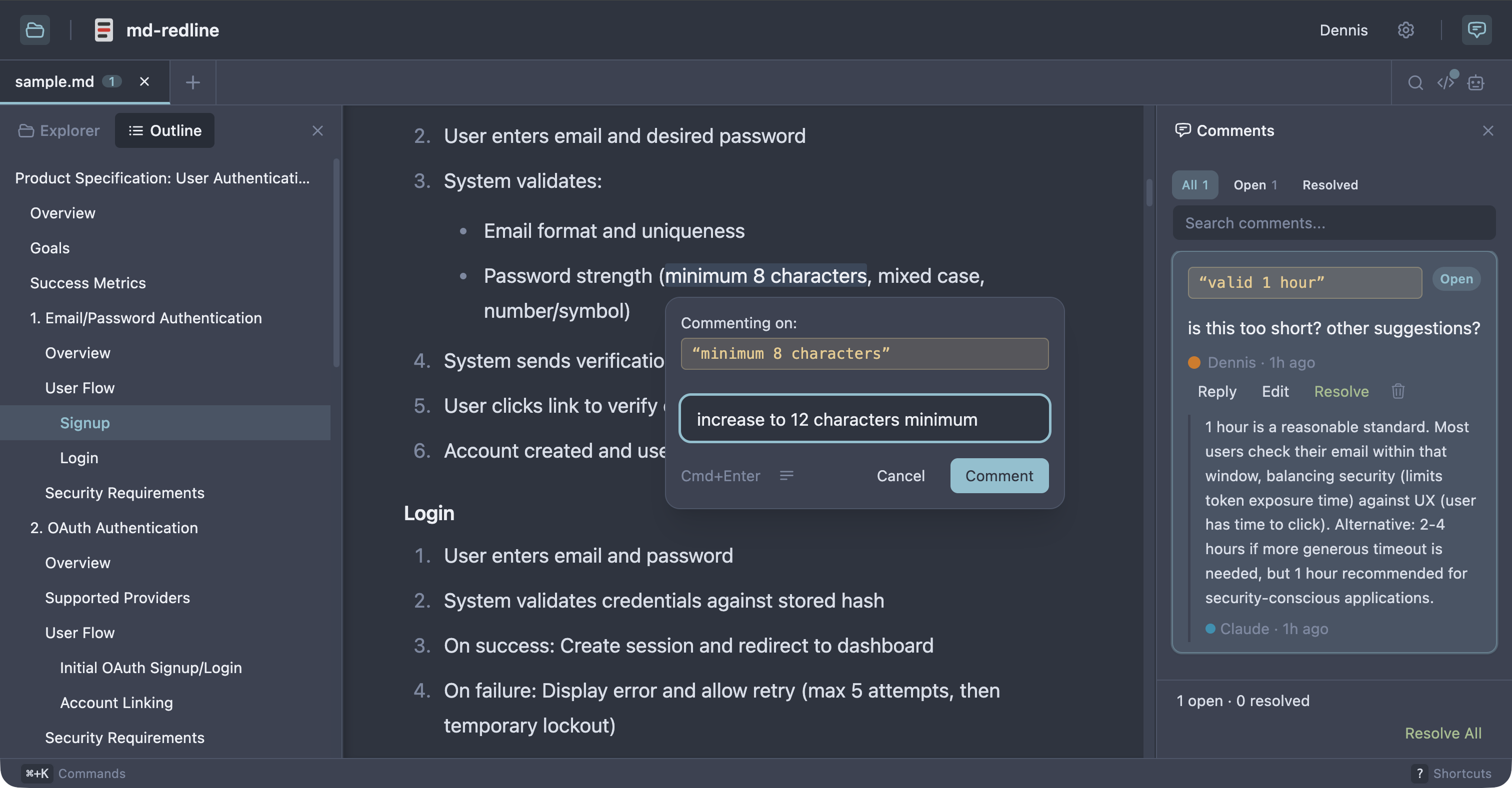
See the full review workflow in 30 seconds:
https://github.com/user-attachments/assets/47a90c14-9a10-4854-8069-bb81ae90a7f1
Works with Claude Code, Claude Desktop, Codex CLI, Gemini CLI, and any other MCP client that supports stdio servers. As Sean Grove argues in specs are the new code, specs are becoming the primary unit of work in agentic development. mdr gives that workflow review tooling closer to code review.
Quick start
Prerequisite: Node 20 or newer.
npx md-redline /path/to/spec.md
This starts the local app if needed and opens it in your browser.
Or install globally:
npm install -g md-redline
mdr /path/to/spec.md        # Open a file
mdr /path/to/dir             # Open a directory
mdr --stop                   # Stop the running server
md-redline also works as an alias for mdr.
MCP setup
Register the MCP server with your agent so it can request reviews mid-task.
Claude Code or Claude Desktop
mdr mcp install                   # register with both clients (default)
mdr mcp install --claude-code     # just Claude Code (via `claude mcp add`)
mdr mcp install --claude-desktop  # just Claude Desktop (JSON config file)
Codex CLI
codex mcp add md-redline -- mdr mcp
Gemini CLI
gemini mcp add --scope user md-redline mdr mcp
The --scope user flag is important. Gemini defaults to per-project scope, which only registers mdr for the current directory.
Other MCP clients
Add this server entry to your client's MCP config file:
{
  "mcpServers": {
    "md-redline": {
      "command": "mdr",
      "args": ["mcp"]
    }
  }
}
Prerequisite: mdr must be on your PATH (e.g. via npm install -g md-redline). If your client spawns subprocesses without inheriting your shell's PATH, use the absolute path from which mdr as the command value.
Review workflow
With MCP (recommended)
Once registered, ask your agent to request a review:
"Let me review docs/specs/feature-x.md in mdr before you continue."
The agent calls mdr_request_review, mdr opens the file, you highlight text and leave comments, then click Send review. The agent receives your feedback as a structured prompt and starts addressing your comments. The review is opt-in per request. The agent only pauses when you ask for it.
Without MCP
- Open a markdown file with
mdr /path/to/spec.md. - Highlight text and leave inline comments.
- Copy the hand-off prompt.
- Paste the prompt into your AI agent.
- The agent edits the file, addresses the feedback, and removes the comment markers it handled.
- Review the result in diff view.
Optional: resolve workflow
Enable resolve mode in Settings for human review with explicit open and resolved states.
Who this is for
- People writing specs, prompts, or design docs locally with file-based AI agents
- Teams reviewing docs before they are committed or sent out for wider review
- Anyone in a human + agent editing loop who wants structured inline feedback in plain files
Non-goals
- Not a collaborative multi-user editing tool.
- Not a replacement for GitHub PR reviews (use those once the file is in git).
- Not designed for untrusted content. This is a local dev tool for your own files.
How comments are stored
Comments are stored as invisible HTML markers directly in the markdown, immediately before the text they refer to, so both humans and agents can work from the same file.
Some text <!-- @comment{
  "id":"uuid",
  "anchor":"highlighted text",
  "text":"Rewrite this section to be clearer.",
  "author":"User",
  "timestamp":"2026-03-26T12:00:00.000Z",
  "replies":[]
} -->highlighted text continues here.
This makes feedback:
- visible to AI agents via a plain file read
- portable with the markdown file
- invisible in normal renderers (GitHub, VS Code preview)
Features
Review and commenting
- Inline comments anchored to rendered text, including overlapping comments
- Threaded replies and optional
open/resolvedreview states - Adjustable anchors with drag handles
- Rendered, raw, and diff views
- Hand-off prompt copying for one or multiple files
Navigation and editing
- Multi-tab editing with session persistence and tab context menus
- File explorer, recent files, and native OS file picker
- Find in document (
Cmd+F) with match navigation - Table of contents with scroll spy
- Command palette (
Cmd+K), keyboard shortcuts, and settings panel (Cmd+,) - Resizable panels and right-click context menus
Rendering and integrations
- Real-time reload via SSE when files change externally
- Mermaid diagram rendering with commentable text
- Local image embeds and clickable links between markdown files
- Customizable comment templates
- 8 themes: Light, Dark, Sepia, Nord, Solarized, GitHub, Rosé Pine, Catppuccin
Supported platforms
- macOS: supported
- Linux: supported; system file picker requires
zenity - Windows: supported; system file picker uses PowerShell
Permissions
By default, md-redline can read any markdown file in your home directory. The first time you run mdr (or the first time after upgrading from a version without the trusted-roots feature), your home folder is added to a trusted-roots list at ~/.md-redline.json. Files outside your home directory (/tmp, mounted volumes, system paths) require an explicit permission grant via the OS folder picker the first time you open them. Granted folders are remembered across restarts.
To use the strict per-folder model instead, run mdr --restrict once after install. This creates a ~/.md-redline.json with no default trust, and you'll grant each folder explicitly the first time you open a file in it.
File saves use atomic write-then-rename and mtime-based conflict detection to prevent data loss from concurrent edits. Mermaid SVG output is sanitized via DOMPurify before rendering. Only run md-redline in environments you trust.
Development
From source
git clone https://github.com/dejuknow/md-redline.git
cd md-redline
npm install
npm run dev
Open the local URL printed by Vite (usually http://localhost:5188).
Scripts
npm run dev          # Start dev server
npm run lint         # Lint
npm test             # Production build + unit tests
npm run test:e2e     # Playwright E2E tests
npm run build        # Production build
Agent eval
The eval harness tests whether AI agents correctly read, address, and remove inline comments.
npm run eval:dryvalidates eval fixturesnpm run evalruns the full eval harness- See eval/README.md for details
Architecture
bin/md-redline             CLI entry point (invoked as `mdr` or `md-redline`)
server/index.ts            Hono server for file I/O, browsing, SSE, and local integrations
src/App.tsx                Main application shell
src/components/            Viewer, sidebar, raw view, diff view, TOC, explorer, settings, etc.
src/hooks/                 State, persistence, selection, file watching, drag handles, tabs
src/lib/comment-parser.ts  Inline comment parsing and mutation helpers
src/markdown/pipeline.ts   Markdown rendering pipeline
eval/                      Eval harness for agent behavior against inline comments
e2e/                       Playwright end-to-end coverage
License
Md Redline Reviews
Login Required
Please log in to share your review and rating for this MCP.
Similar MCP Servers like Md Redline
Explore related MCPs that share similar capabilities and solve comparable challenges
Headroom
by headroomlabs-ai
Compress tool outputs, logs, files, RAG chunks, and conversation history before they reach the LLM, keeping answers identical while saving up to 95% of tokens for JSON payloads.
Git
Officialby modelcontextprotocol
A Model Context Protocol server for Git repository interaction and automation.
Zed
OfficialClientby zed-industries
A high‑performance, multiplayer code editor designed for speed and collaboration.
Everything
Officialby modelcontextprotocol
Model Context Protocol Servers
Time
Officialby modelcontextprotocol
A Model Context Protocol server that provides time and timezone conversion capabilities.
Cline
OfficialClientby cline
An autonomous coding assistant that can create and edit files, execute terminal commands, and interact with a browser directly from your IDE, operating step‑by‑step with explicit user permission.
Context7 MCP
Officialby upstash
Provides up-to-date, version‑specific library documentation and code examples directly inside LLM prompts, eliminating outdated information and hallucinated APIs.
Daytona
by daytonaio
Provides a secure, elastic infrastructure that creates isolated sandboxes for running AI‑generated code with sub‑90 ms startup, unlimited persistence, and OCI/Docker compatibility.
Continue
OfficialClientby continuedev
Enables faster shipping of code by integrating continuous AI agents across IDEs, terminals, and CI pipelines, offering chat, edit, autocomplete, and customizable agent workflows.