
Mcp Server Vms
by
Provides control and access to a video surveillance system, allowing retrieval of live and recorded video streams, channel status queries, PTZ camera positioning, and playback dialog management.
Mcp Server Vms Overview
Mcp Server Vms
What is Mcp Server Vms about?
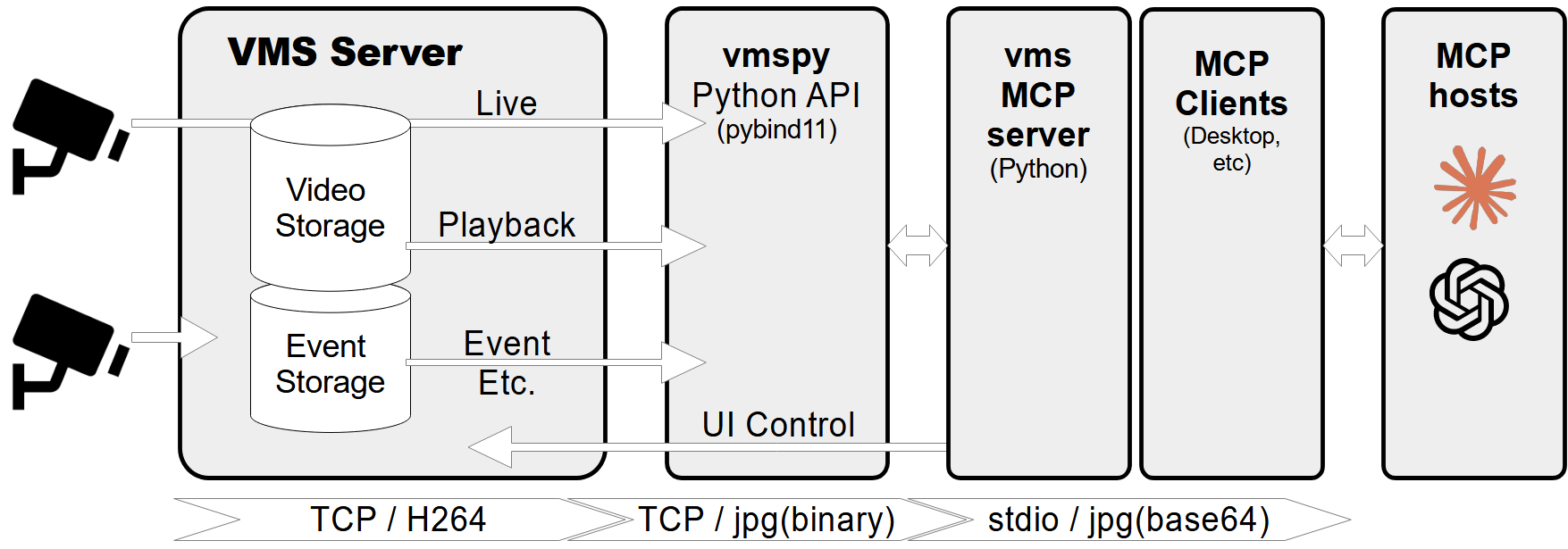
Mcp Server Vms is a Model Context Protocol server that connects to a CCTV recording program (VMS) to fetch channel information, live images, recorded frames, and to control PTZ cameras. It enables external applications to interact with the VMS without needing direct access to the VMS UI.
How to use Mcp Server Vms?
- Install prerequisites: Python 3.12+, the
vmspylibrary, andPillow. - Install UV package manager (optional for running the server).
- Download and install the VMS server from the vendor site.
- Place the
vmspybinary and FFmpeg DLLs in the project folder as shown in the repository tree. - Configure the server by editing
mcp_vms_config.pywith the correct VMS connection details (IP, port, credentials, image size, pixel format). - Run the server using the command defined in the
serverConfig(e.g.,uv run mcp_vms.py). - Integrate with Claude Desktop (or any MCP client) by adding the entry shown in the README to
claude_desktop_config.json.
Key features of Mcp Server Vms
- Retrieve channel metadata, connection status, and recording state.
- Query available recording dates/times for any channel.
- Capture live snapshots or specific recorded frames as images.
- Launch live video streams or playback dialogs for a given channel/timestamp.
- PTZ camera control with preset positioning.
- Robust error handling and logging for troubleshooting.
Use cases of Mcp Server Vms
- Security operations centers needing programmatic access to video feeds for automated analysis.
- AI model integration where live or recorded frames are sent to computer‑vision services.
- Remote monitoring tools that display specific camera feeds without installing the full VMS client.
- Incident investigation scripts that pull snapshots from particular timestamps.
- PTZ automation scripts that move cameras to predefined positions based on events.
FAQ from the Mcp Server Vms
Q: Which Python version is required? A: Python 3.12 or newer.
Q: Do I need the full VMS software installed? A: Yes, the VMS server must be installed and running; the MCP server only acts as a client.
Q: How do I change the image resolution?
A: Edit img_width and img_height in mcp_vms_config.py.
Q: Can I run the server on Linux?
A: The provided binaries (vmspy.pyd and FFmpeg DLLs) are Windows‑specific. Linux would require compatible VMS client libraries.
Q: How is authentication handled?
A: Credentials are supplied in mcp_vms_config.py (access_id and access_pw). Ensure they match the VMS configuration.
Mcp Server Vms's README
MCP Server - VMS Integration
A Model Context Protocol (MCP) server designed to connect to a CCTV recording program (VMS) to retrieve recorded and live video streams. It also provides tools to control the VMS software, such as showing live or playback dialogs for specific channels at specified times.
Features
- Retrieve video channel information, including connection and recording status.
- Fetch recording dates and times for specific channels.
- Fetch live or recorded images from video channels.
- Show live video streams or playback dialogs for specific channels and timestamps.
- Control PTZ (Pan-Tilt-Zoom) cameras by moving them to preset positions.
- Comprehensive error handling and logging.
Prerequisites
- Python 3.12+
vmspylibrary (for VMS integration)Pillowlibrary (for image processing)
MCP-server Configuration
If you want to use mcp-vms with Claude desktop, you need to set up the claude_desktop_config.json file as follows:
{
  "mcpServers": {
	"vms": {
	  "command": "uv",
	  "args": [
		"--directory",
		"X:\\path\\to\\mcp-vms",
		"run",
		"mcp_vms.py"
	  ]
	}
  }
}
VMS Connection Configuration
The server uses the following default configuration for connecting to the VMS:
- mcp_vms_config.py
vms_config = {
    'img_width': 320,
    'img_height': 240,
    'pixel_format': 'RGB',
    'url': '127.0.0.1',
    'port': 3300,
    'access_id': 'admin',
    'access_pw': 'admin',
}
Installation
1. Install UV Package Manager
Run the following command in PowerShell to install UV:
powershell -ExecutionPolicy ByPass -c "irm https://astral.sh/uv/install.ps1 | iex"
For alternative installation methods, see the official UV documentation.
2.Install VMS Server
Download and install the VMS server from:
http://surveillance-logic.com/en/download.html
(Required before using this MCP server)
3.Install Python Dependencies
Download the vmspy library:
vmspy1.4-python3.12-x64.zip
Extract the contents into your mcp_vms directory
The mcp-vms directory should look like this:
mcp-vms/
├── .gitignore
├── .python-version
├── LICENSE
├── README.md
├── pyproject.toml
├── uv.lock
├── mcp_vms.py            # Main server implementation
├── mcp_vms_config.py     # VMS connection configuration
├── vmspy.pyd             # VMS Python library
├── avcodec-61.dll        # FFmpeg libraries
├── avutil-59.dll
├── swresample-5.dll
├── swscale-8.dll

Mcp Server Vms Reviews
Login Required
Please log in to share your review and rating for this MCP.
Similar MCP Servers like Mcp Server Vms
Explore related MCPs that share similar capabilities and solve comparable challenges
Carbon
by crbnos
Open-source manufacturing ERP, MES and QMS platform that unifies quoting, material requirements planning, inventory, shop‑floor execution, quality management and lot/serial traceability in a single Postgres schema with a REST API and built‑in MCP server. Deploy on Carbon Cloud or self‑host on any VPS/AWS environment.
ROS MCP Server
by robotmcp
Enables bidirectional integration of large language models with ROS‑enabled robots, allowing natural language commands and real‑time access to robot state, topics, services and parameters.
Flightradar24 MCP Server
by sunsetcoder
Track flights in real time, retrieve arrival and departure times, view airport status, and monitor emergency situations using Flightradar24 data via a Model Context Protocol server.
Emerging Markets MCP
by theYahia
Provides a comprehensive catalog of MCP servers covering APIs from emerging markets across Brazil, MENA, Gulf, Southeast Asia, Africa, CIS, and Iran, enabling seamless integration with non‑Western services.
Catia V5 MCP Server
by daiemon12
Provides a Model Context Protocol server that lets Claude AI drive Dassault Systèmes CATIA V5 through natural‑language commands, exposing more than 50 CAD operations via COM automation.
EduBase MCP Server
by EduBase
Enables Claude and other LLMs to interact with the EduBase e‑learning platform via the Model Context Protocol, allowing automated quiz creation, exam scheduling, and result analysis.
Federal Contracting MCPs
by 1102tools-dev
Provides deterministic, version‑controlled MCP servers that expose federal contracting and policy data from SAM.gov, USASpending, GSA CALC+, BLS OEWS, eCFR, Federal Register, Regulations.gov, and Acquisition.gov.
CAD/CAE Copilot
by armpro24-blip
Enables AI-driven generation, editing, verification, and simulation of mechanical designs using build123d/OpenCASCADE geometry and CalculiX analysis, while preserving editable parameters, stable topology pointers, and full provenance in a reproducible .aieng package.
Atomno Mcp Fns Check
by atomno-mcp
Provides aggregated verification of Russian legal entities and individual entrepreneurs using publicly available Federal Tax Service data, delivering a deterministic risk verdict and actionable recommendations for AI agents and compliance workflows.