
Slack MCP Server
by
Provides a local‑first bridge that enables Claude to read, search, and send messages using an existing Slack user session, supporting both stdio/web workflows and a secure hosted HTTP endpoint.
Slack MCP Server Overview
What is Slack MCP Server about?
Slack MCP Server creates a secure, local bridge between Claude (or other Model Context Protocol clients) and a user's existing Slack session. It mirrors the exact permissions of the logged‑in browser session, allowing full‑access read, search, export, and write operations without requiring a bot token or OAuth flow.
How to use Slack MCP Server?
- Verify compatibility
npx -y @jtalk22/slack-mcp --version npx -y @jtalk22/slack-mcp --doctor npx -y @jtalk22/slack-mcp --status - Run the interactive setup wizard (recommended) to extract and validate Slack tokens:
npx -y @jtalk22/slack-mcp --setup- macOS: automatically pulls tokens from Chrome.
- Linux/Windows: guides you to copy
xoxc-andxoxd-values manually.
- Local stdio / web usage (no extra configuration needed after tokens are saved at
~/.slack-mcp-tokens.json). - Hosted HTTP mode (remote connector for Claude.ai):
The server listens onexport SLACK_TOKEN=xoxc-... export SLACK_COOKIE=xoxd-... export SLACK_MCP_HTTP_AUTH_TOKEN=change-this export SLACK_MCP_HTTP_ALLOWED_ORIGINS=https://claude.ai node src/server-http.js/mcpand requiresAuthorization: Bearer <SLACK_MCP_HTTP_AUTH_TOKEN>. - Web UI fallback (optional):
Opensnpx -y @jtalk22/slack-mcp webhttp://localhost:3000with a one‑click magic link.
Key Features
- Read any message (DMs, private, public channels).
- Full workspace export with threads and resolved usernames.
- Powerful search across all conversations.
- Send messages with optional thread support.
- User directory lookup (500+ users, pagination).
- Automatic token refresh on macOS (Chrome extraction).
- Atomic file writes and zombie‑process protection for reliability.
- Rate‑limit handling with exponential backoff & jitter.
- Secure defaults for hosted HTTP: bearer auth and explicit CORS allow‑list.
- Multiple transport modes:
stdio,webUI, and remote HTTP.
Use Cases
- Claude‑assisted knowledge retrieval – ask Claude “What did X say about Y?” and get direct Slack context.
- Automated reporting – generate summaries of channels or threads on demand.
- Customer support bots – pull recent conversation history to inform responses.
- Team retrospectives – export a full‑history archive for analysis.
- Cross‑tool workflows – combine Slack data with other MCP‑compatible tools (e.g., code assistants, automation agents).
FAQ
Q: My tokens keep expiring. How do I refresh them?
- macOS: the built‑in Chrome extractor runs automatically every few hours.
- Linux/Windows: re‑run
npx -y @jtalk22/slack-mcp --setupor manually edit~/.slack-mcp-tokens.json.
Q: Do I need a Slack bot or OAuth app?
- No. The server reuses the credentials of the logged‑in user session, giving it the same view you have in the browser.
Q: Can I expose the server to the internet?
- Yes, via the hosted HTTP mode. It is secured by default with a bearer token (
SLACK_MCP_HTTP_AUTH_TOKEN) and an explicit CORS allow‑list (SLACK_MCP_HTTP_ALLOWED_ORIGINS). UseSLACK_MCP_HTTP_INSECURE=1only for local testing.
Q: What platforms are supported?
- macOS, Linux, Windows for the core MCP server.
- Automatic Chrome token extraction only on macOS.
Q: How does the Web UI authenticate?
- It prints a one‑click URL containing a randomly generated API key; the key is stored in the browser session and removed from the URL after navigation.
Q: Is my Slack token stored safely?
- Tokens are written with
chmod 600, optionally backed by macOS Keychain, and never committed to source control.
Q: Which Claude clients work with this server?
- Claude Desktop (macOS/Windows/Linux), Claude Code CLI, any MCP‑compatible client using the
stdio,web, or remote HTTP transport.
Slack MCP Server's README
Slack MCP Server
Local-first Slack MCP server using your existing Slack session. Hosted HTTP is secure-default; local stdio/web workflows stay unchanged.
Live demo · Latest release · npm package
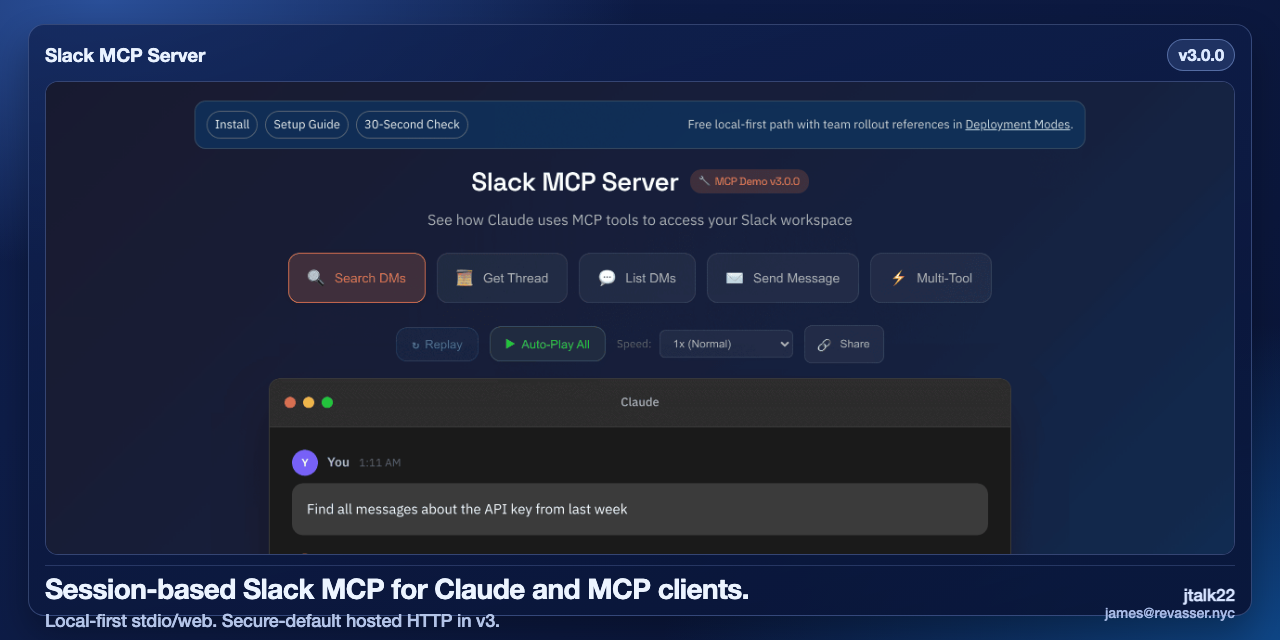
30-Second Verify
npx -y @jtalk22/slack-mcp@latest --version
npx -y @jtalk22/slack-mcp@latest --doctor
npx -y @jtalk22/slack-mcp@latest --status
If this project saves you setup time, star the repo: https://github.com/jtalk22/slack-mcp-server · Support ongoing maintenance: GitHub Sponsors, Ko-fi, Buy Me a Coffee
Maintainer/operator: jtalk22 (james@revasser.nyc)
Release: v3.0.0 · Notes: v3.0.0 notes · Support: deployment intake
v3.0.0 at a Glance
- Hosted HTTP
/mcpnow requires bearer auth by default (SLACK_MCP_HTTP_AUTH_TOKEN). - Hosted HTTP CORS now uses explicit allowlisting (
SLACK_MCP_HTTP_ALLOWED_ORIGINS). - Local-first paths (
stdio,web) stay compatible. - MCP tool names stay stable (no renames/removals).
60-Second Hosted Migration
export SLACK_TOKEN=xoxc-...
export SLACK_COOKIE=xoxd-...
export SLACK_MCP_HTTP_AUTH_TOKEN=change-this
export SLACK_MCP_HTTP_ALLOWED_ORIGINS=https://claude.ai
node src/server-http.js
Request with:
Authorization: Bearer <SLACK_MCP_HTTP_AUTH_TOKEN>
Emergency local fallback only:
SLACK_MCP_HTTP_INSECURE=1 node src/server-http.js
For guided hosted rollout requirements, open: deployment intake
Why This Exists
I built this because I was working with someone to help me manage a complex workload, and we kept hitting walls. They needed context from my messages—"what did X say about Y?"—and standard app/OAuth flows were too constrained for that workflow.
Screenshotting messages is not a workflow.
This server bridges the gap. It creates a secure, local bridge between Claude and your Slack web session. It gives your MCP client the same access you already have in the browser—search history, summarize threads, and retrieve prior context—without fighting the platform.
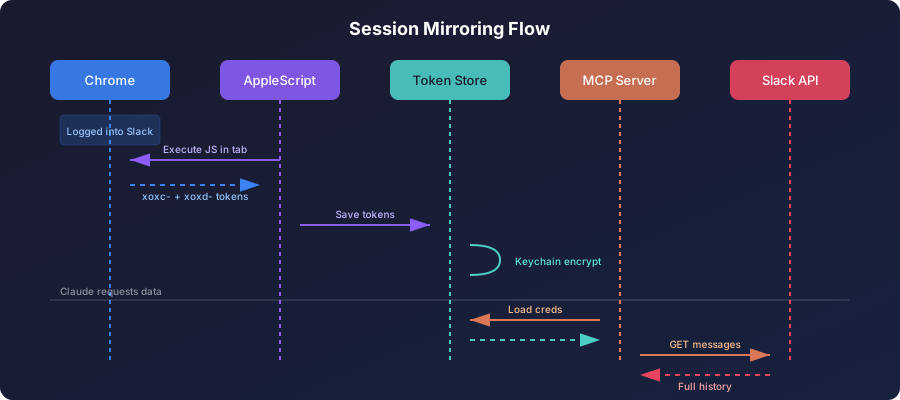
Architecture: Local Session Mirroring
Instead of authenticating as a bot, this server leverages your existing Chrome session credentials (macOS) or manual token injection (Linux/Windows). It mirrors your user access exactly—if you can see it in Slack, Claude can see it too.
Why Not OAuth?
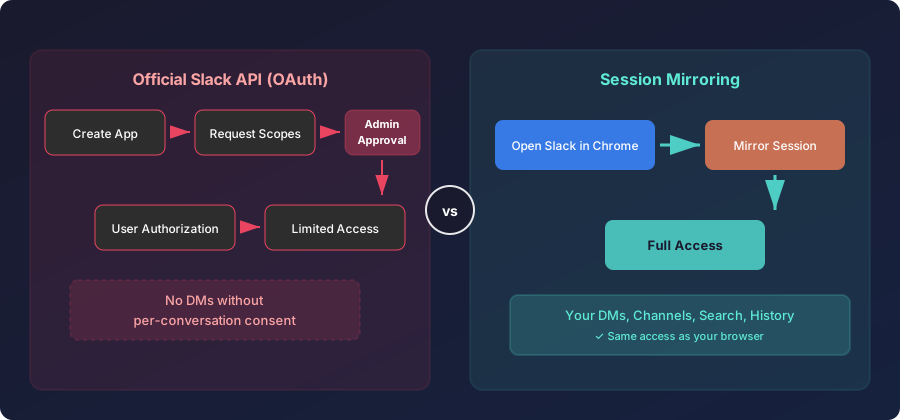
Trade-off: Session tokens expire every 1-2 weeks. Auto-refresh (macOS) or manual update keeps things running.
Features
Core Capabilities
- Read Any Message - DMs, private channels, public channels
- Full Export - Conversations with threads and resolved usernames
- Search - Query across your entire workspace
- Send Messages - DMs or channels, with thread support
- User Directory - List and search 500+ users with pagination
Stability
- Auto Token Refresh - Extracts fresh tokens from Chrome automatically (macOS only)
- Atomic Writes - File operations use temp-file-then-rename to prevent corruption
- Zombie Protection - Background timers use
unref()for clean process exit - Race Condition Safety - Mutex locks prevent concurrent token extraction
- Rate Limit Handling - Exponential backoff with jitter
Tools
| Tool | Description |
|---|---|
slack_health_check |
Verify token validity and workspace info |
slack_token_status |
Detailed token age, health, and cache stats |
slack_refresh_tokens |
Auto-extract fresh tokens from Chrome |
slack_list_conversations |
List DMs/channels (with lazy discovery cache) |
slack_conversations_history |
Get messages from a channel or DM |
slack_get_full_conversation |
Export full history with threads |
slack_search_messages |
Search across workspace |
slack_send_message |
Send a message to any conversation |
slack_get_thread |
Get thread replies |
slack_users_info |
Get user details |
slack_list_users |
List workspace users (paginated, 500+ supported) |
Quick Start
Runtime: Node.js 20+
30-Second Compatibility Check
npx -y @jtalk22/slack-mcp --setup
npx -y @jtalk22/slack-mcp --doctor
npx -y @jtalk22/slack-mcp --status
Expected:
--setuplaunches the interactive wizard--doctorreturns one clear next action with exit code:0ready1missing credentials2invalid/expired credentials3connectivity/runtime issue
--statusis read-only and non-mutating
Command reference: HN launch kit
Known Working Clients
- Claude Desktop (macOS/Windows/Linux)
- Claude Code CLI
- Local browser mode (
web) - Hosted Node runtime (
http) - Cloudflare Worker / Smithery transport
Compatibility matrix: compatibility matrix
Option A: npm (Recommended)
npm install -g @jtalk22/slack-mcp
Option B: Clone Repository
git clone https://github.com/jtalk22/slack-mcp-server.git
cd slack-mcp-server
npm install
Option C: Docker
docker pull ghcr.io/jtalk22/slack-mcp-server:latest
Install Sanity (Clean Temp Directory)
tmpdir="$(mktemp -d)"
cd "$tmpdir"
npx -y @jtalk22/slack-mcp --version
npx -y @jtalk22/slack-mcp --help
npx -y @jtalk22/slack-mcp --status
Expected:
--versionand--helpexit0--statusexits non-zero until credentials are configured--statusis read-only and never attempts Chrome extraction
Configuration
Step 1: Get Your Tokens
Setup Wizard (Recommended)
The interactive setup wizard handles token extraction and validation automatically:
npx -y @jtalk22/slack-mcp --setup
- macOS: Auto-extracts tokens from Chrome (have Slack open in a tab)
- Linux/Windows: Guides you through manual extraction step-by-step
- Validates tokens against Slack API before saving
- Stores tokens securely at
~/.slack-mcp-tokens.json
Check Token Status
npx -y @jtalk22/slack-mcp --status
Alternative: Manual Token Scripts
# macOS auto-extraction
npm run tokens:auto

# Manual entry (all platforms)
npm run tokens:refresh

# Check health
npm run tokens:status
Step 2: Configure Claude
Claude Desktop (macOS)
Edit ~/Library/Application Support/Claude/claude_desktop_config.json:
{
  "mcpServers": {
    "slack": {
      "command": "npx",
      "args": ["-y", "@jtalk22/slack-mcp"]
    }
  }
}
Claude Desktop (Windows)
Edit %APPDATA%\Claude\claude_desktop_config.json:
{
  "mcpServers": {
    "slack": {
      "command": "npx",
      "args": ["-y", "@jtalk22/slack-mcp"],
      "env": {
        "SLACK_TOKEN": "xoxc-your-token",
        "SLACK_COOKIE": "xoxd-your-cookie"
      }
    }
  }
}
Note: Windows/Linux users must provide tokens via
envsince auto-refresh is macOS-only.
Claude Code (CLI)
Add to ~/.claude.json:
{
  "mcpServers": {
    "slack": {
      "type": "stdio",
      "command": "npx",
      "args": ["-y", "@jtalk22/slack-mcp"]
    }
  }
}
Claude Code reads tokens from ~/.slack-mcp-tokens.json automatically.
Docker Configuration
{
  "mcpServers": {
    "slack": {
      "command": "docker",
      "args": ["run", "-i", "--rm",
               "-v", "~/.slack-mcp-tokens.json:/root/.slack-mcp-tokens.json",
               "ghcr.io/jtalk22/slack-mcp-server"]
    }
  }
}
Step 3: Restart Claude
Fully quit and reopen Claude. The Slack tools will appear.
Architecture
Token Persistence (4 Layers)
Priority 1: Environment Variables (SLACK_TOKEN, SLACK_COOKIE)
    ↓ fallback
Priority 2: Token File (~/.slack-mcp-tokens.json)
    ↓ fallback
Priority 3: macOS Keychain (encrypted)
    ↓ fallback
Priority 4: Chrome Auto-Extraction (macOS only)
Stability Features
Atomic Writes
All file operations (tokens, DM cache) use atomic writes:
Write to temp file → chmod 600 → rename to target
This prevents JSON corruption if the process is killed mid-write.
Zombie Process Protection
Background refresh timers use unref():
const timer = setInterval(refreshTokens, 4 * 60 * 60 * 1000);
timer.unref(); // Process can exit even if timer is pending
When Claude closes the MCP connection, the server exits cleanly.
Race Condition Prevention
A mutex lock prevents concurrent Chrome extractions:
if (refreshInProgress) return null; // Skip if already refreshing
refreshInProgress = true;
try { return extractFromChromeInternal(); }
finally { refreshInProgress = false; }
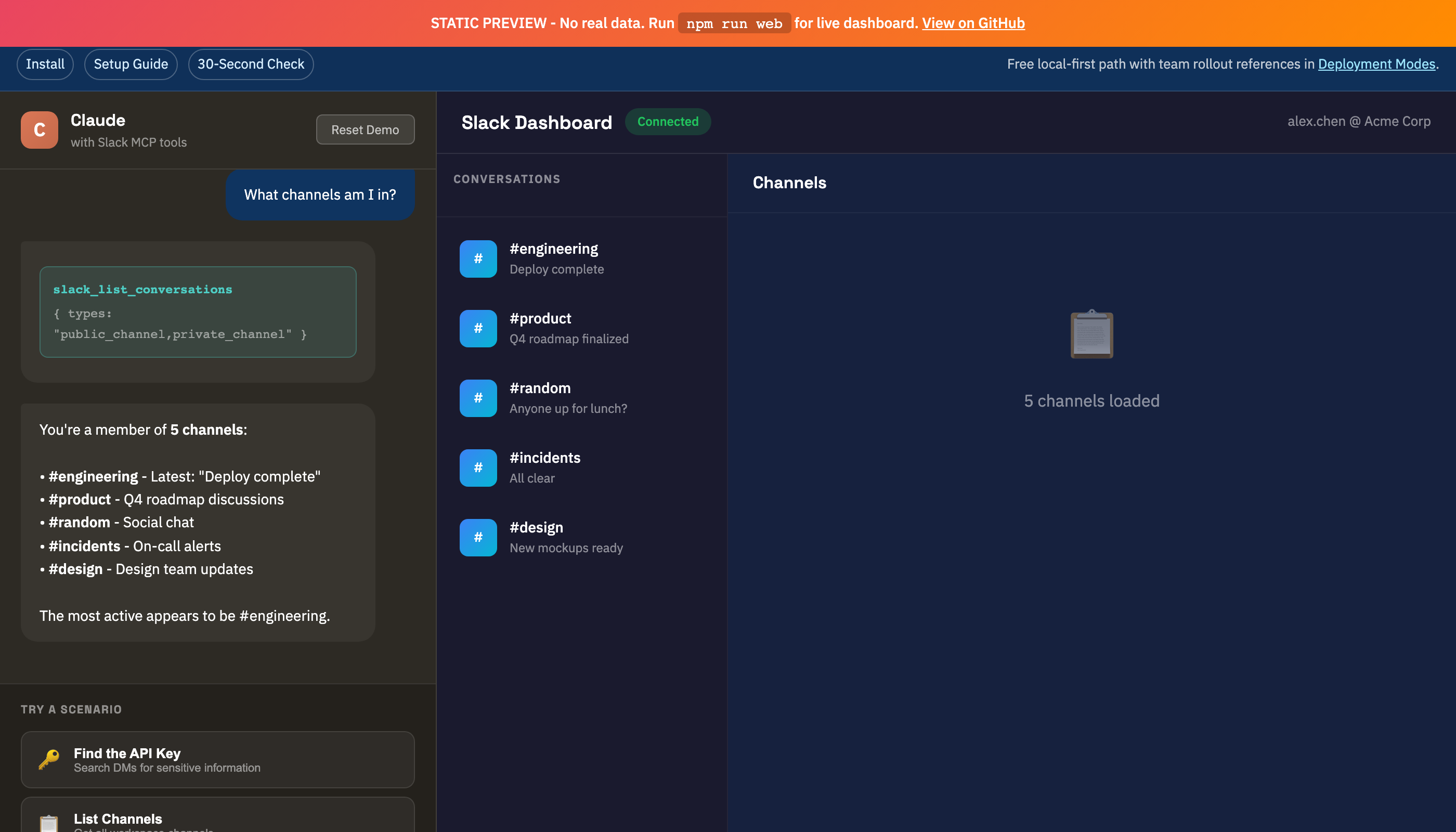
Web UI (optional browser/local fallback)
Claude now supports remote MCP connectors on paid plans. For claude.ai, the preferred path is adding a remote connector in Settings -> Connectors.
Reference:
- https://support.anthropic.com/en/articles/11995447-connectors-in-claude
- https://support.anthropic.com/en/articles/11175166-about-custom-integrations-using-remote-mcp
Use this Web UI when you want a local localhost dashboard, REST access, or a fallback workflow without remote connector hosting:
npm run web
# Or: npx -y @jtalk22/slack-mcp web
Magic Link: The console prints a one-click URL with the API key embedded:
════════════════════════════════════════════════════════════
  Slack Web API Server v3.0.0
════════════════════════════════════════════════════════════

  Dashboard: http://localhost:3000/?key=smcp_xxxxxxxxxxxx
Just click the link - no copy-paste needed. The key is saved to your browser and stripped from the URL for security.
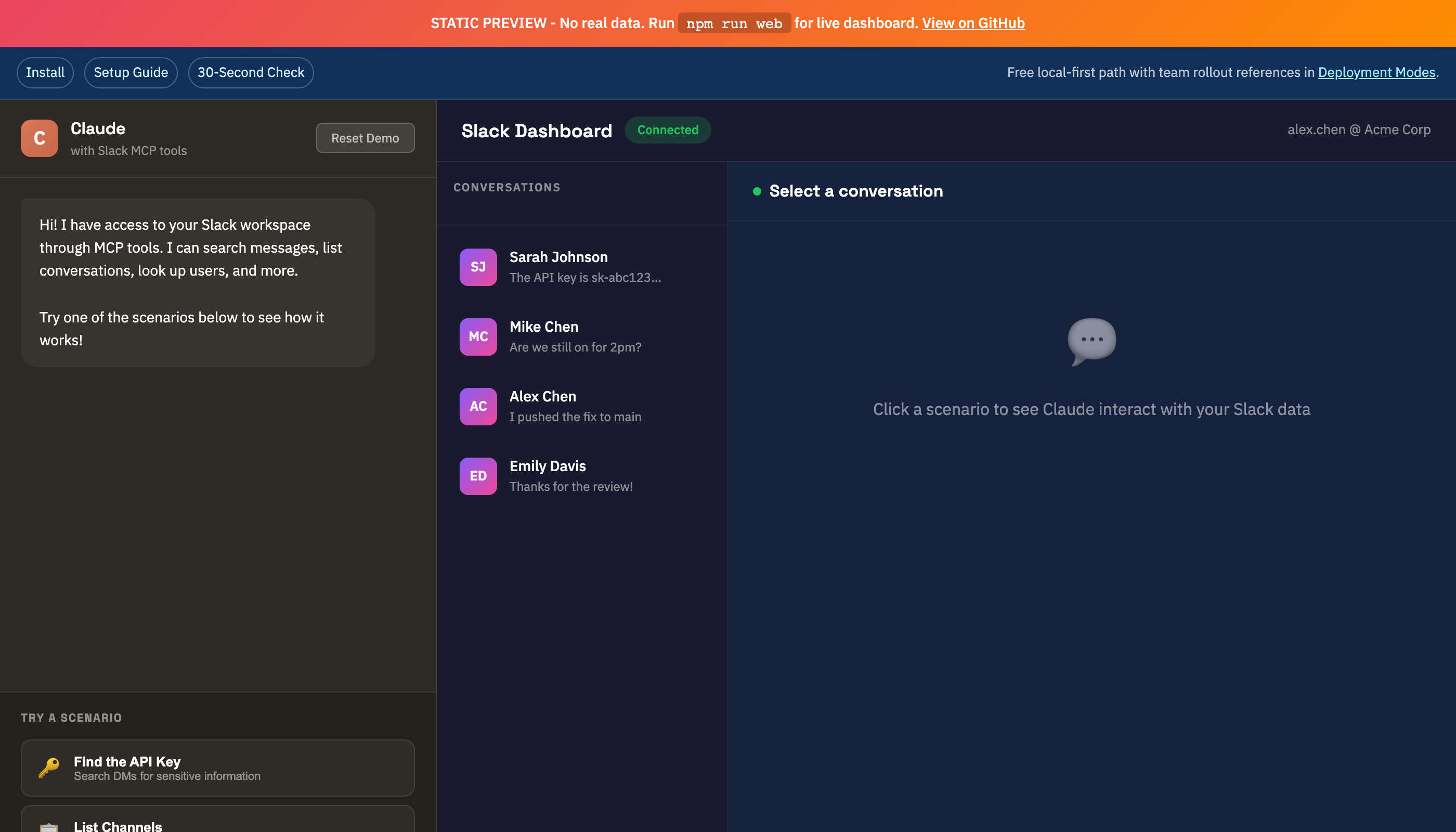
| DMs View | Channels View |
|---|---|
|
 |
Hosted HTTP Mode (Secure Defaults)
Use this mode only when you need a remote MCP endpoint:
SLACK_TOKEN=xoxc-...
SLACK_COOKIE=xoxd-...
SLACK_MCP_HTTP_AUTH_TOKEN=change-this
SLACK_MCP_HTTP_ALLOWED_ORIGINS=https://claude.ai
node src/server-http.js
Behavior:
/mcprequiresAuthorization: Bearer <SLACK_MCP_HTTP_AUTH_TOKEN>by default.- Cross-origin browser calls are denied unless origin is listed in
SLACK_MCP_HTTP_ALLOWED_ORIGINS. - For local testing only, you can opt out with
SLACK_MCP_HTTP_INSECURE=1.
Operations Guides
- Docs Index - One-click index for setup, API, troubleshooting, deployment, and support docs
- Deployment Modes - Choose the right operating model (
stdio,web, hosted HTTP, Smithery/Worker) - Use Case Recipes - 12 copy/paste prompts mapped to current tool contracts
- Support Boundaries - Scope, response targets, and solo-maintainer capacity limits
- Release Health - Track setup reliability and support-load targets through this release cycle
If you're evaluating team rollout, start with Deployment Modes before exposing remote endpoints.
Getting Help Fast
- Run:
npx -y @jtalk22/slack-mcp --version npx -y @jtalk22/slack-mcp --doctor - If setup fails, run:
npx -y @jtalk22/slack-mcp --setup - Open an issue with full environment details:
- For guided hosted rollout support:
- Check scope and response targets:
Troubleshooting
Tokens Expired
# macOS: Auto-refresh from Chrome
slack_refresh_tokens  # In Claude
# Or: npm run tokens:auto

# Package setup wizard
npx -y @jtalk22/slack-mcp --setup

# Linux/Windows: Manual update
# Edit ~/.slack-mcp-tokens.json with fresh values
DMs Not Showing
Use discover_dms: true to force discovery:
slack_list_conversations with discover_dms=true
This caches DM channel IDs for 24 hours.
Chrome Extraction Fails
- Chrome must be running (not minimized to Dock)
- Slack tab must be open at
app.slack.com - You must be logged in
- In Chrome menu, enable
View > Developer > Allow JavaScript from Apple Events
Claude Desktop Not Seeing Tools
- Verify JSON syntax in config file
- Check logs:
~/Library/Logs/Claude/mcp*.log - Fully restart Claude (Cmd+Q, then reopen)
Project Structure
slack-mcp-server/
├── src/
│   ├── server.js         # MCP server (stdio transport)
│   └── web-server.js     # REST API + Web UI
├── lib/
│   ├── token-store.js    # 4-layer persistence + atomic writes
│   ├── slack-client.js   # API client, LRU cache, retry logic
│   ├── tools.js          # MCP tool definitions
│   └── handlers.js       # Tool implementations
├── public/
│   ├── index.html        # Web UI
│   └── demo.html         # Interactive demo
└── scripts/
    └── token-cli.js      # Token management CLI
Security
- Token files stored with
chmod 600(owner-only) - macOS Keychain provides encrypted backup
- Web server binds to localhost only
- Never commit tokens to version control
- API keys are cryptographically random (
crypto.randomBytes)
Platform Support
| Feature | macOS | Linux | Windows |
|---|---|---|---|
| MCP Server | Yes | Yes | Yes |
| Token File | Yes | Yes | Yes |
| Auto-Refresh from Chrome | Yes | No | No |
| Keychain Storage | Yes | No | No |
| Web UI | Yes | Yes | Yes |
Contributing
PRs welcome. Run node --check on modified files before submitting.
If this project saves you setup time, consider starring the repository.
License
MIT - See LICENSE
Disclaimer
This project uses unofficial Slack APIs. Use at your own risk. Not affiliated with or endorsed by Slack Technologies.
Slack MCP Server Reviews
Login Required
Please log in to share your review and rating for this MCP.
Similar MCP Servers like Slack MCP Server
Explore related MCPs that share similar capabilities and solve comparable challenges
Activepieces
by activepieces
A self‑hosted, open‑source platform that provides a no‑code builder for creating, versioning, and running AI‑driven automation workflows. Pieces are TypeScript‑based plugins that become MCP servers, allowing direct consumption by large language models.
Skyvern
Officialby Skyvern-AI
Automates browser‑based workflows by leveraging large language models and computer‑vision techniques, turning natural‑language prompts into fully functional web interactions without writing custom scripts.
BlenderMCP
Officialby ahujasid
Enables Claude AI to control Blender for prompt‑assisted 3D modeling, scene creation, and manipulation via a socket‑based Model Context Protocol server.
Pipedream
by PipedreamHQ
Connect APIs quickly with a free, hosted integration platform that enables event‑driven automations across 1,000+ services and supports custom code in Node.js, Python, Go, or Bash.
Inbox Zero
by elie222
Organizes email inbox, drafts replies in the user's tone, tracks follow‑ups, and provides analytics to achieve inbox zero quickly.
Cursor Talk To Figma
by grab
Enables Cursor AI to read and programmatically modify Figma designs through a Model Context Protocol integration.
Windows MCP
by CursorTouch
Enables AI agents to control the Windows operating system, performing file navigation, application launching, UI interaction, QA testing, and other automation tasks through a lightweight server.
Ableton MCP
by ahujasid
Enables Claude AI to control Ableton Live in real time, allowing AI‑driven creation, editing, and playback of tracks, clips, instruments, and effects through a socket‑based server.
N8n Mcp Server
by leonardsellem
Provides tools and resources to enable AI assistants to manage and execute n8n workflows via natural language commands.