
EdgeOne Pages MCP
by
Deploy HTML, folders, or zip archives to EdgeOne Pages and instantly obtain a public URL for fast edge delivery.
EdgeOne Pages MCP Overview
What is EdgeOne Pages MCP about?
EdgeOne Pages MCP provides a rapid way to push static HTML content, entire directories, or zip packages to EdgeOne Pages. After deployment the service stores the assets in EdgeOne KV and returns a publicly accessible URL that is served from the edge.
How to use EdgeOne Pages MCP?
- Install the MCP server (e.g., via
npx edgeone-pages-mcp). - Configure optional environment variables:
EDGEONE_PAGES_API_TOKEN– your EdgeOne Pages API token.EDGEONE_PAGES_PROJECT_NAME– existing project name to update, or leave empty to create a new project.
- Use the MCP protocol tools (
deploy_html,deploy_folder,deploy_zip) to send content to the server. - The server deploys the content to EdgeOne Pages, stores it in KV, and returns a public URL.
Key Features
- Standard MCP interface – works with any MCP‑compatible client.
- Supports HTML, folders, and zip files – flexible deployment options.
- Automatic KV storage – content is cached at the edge for low‑latency access.
- Public URL generation – each deployment receives a unique, instantly reachable URL.
- Optional project update – supply a project name to update an existing EdgeOne Pages site.
Use Cases
- Quickly preview generated web pages from LLMs.
- Deploy static documentation sites or marketing landing pages without a full CI/CD pipeline.
- Share prototype UI mockups with stakeholders via a single URL.
- Host single‑page applications or demos directly from edge storage.
FAQ
Q: Do I need an EdgeOne Pages account? A: Yes, an account and an API token are required for deployments. The token can be obtained from the EdgeOne Pages console.
Q: Can I deploy to an existing project?
A: Provide the existing project name in EDGEONE_PAGES_PROJECT_NAME. The server will update that project instead of creating a new one.
Q: What Node.js version is required? A: Node.js 18 or higher.
Q: How is the public URL formed? A: After deployment the server queries the EdgeOne Pages API for the base URL of the project and appends the path to the stored asset.
Q: Is there a HTTP‑streamable version of the server?
A: Yes, a Streamable HTTP MCP server can be used by pointing the url field to https://mcp-on-edge.edgeone.site/mcp-server.
EdgeOne Pages MCP's README
EdgeOne Pages MCP
An MCP service for deploying HTML content, folders, or full-stack projects to EdgeOne Pages and obtaining publicly accessible URLs.
Demo
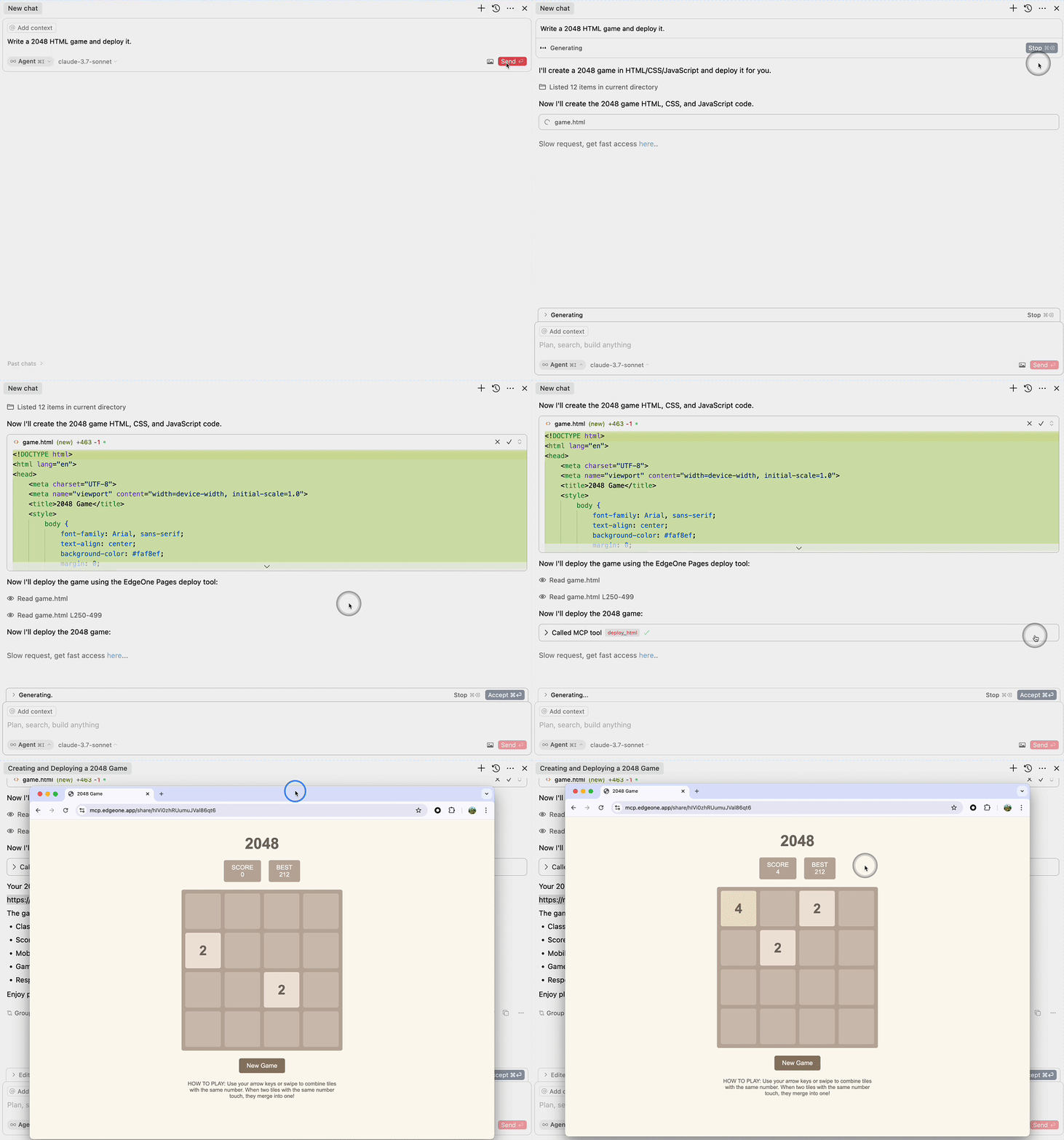
Deploy HTML
Deploy Folder
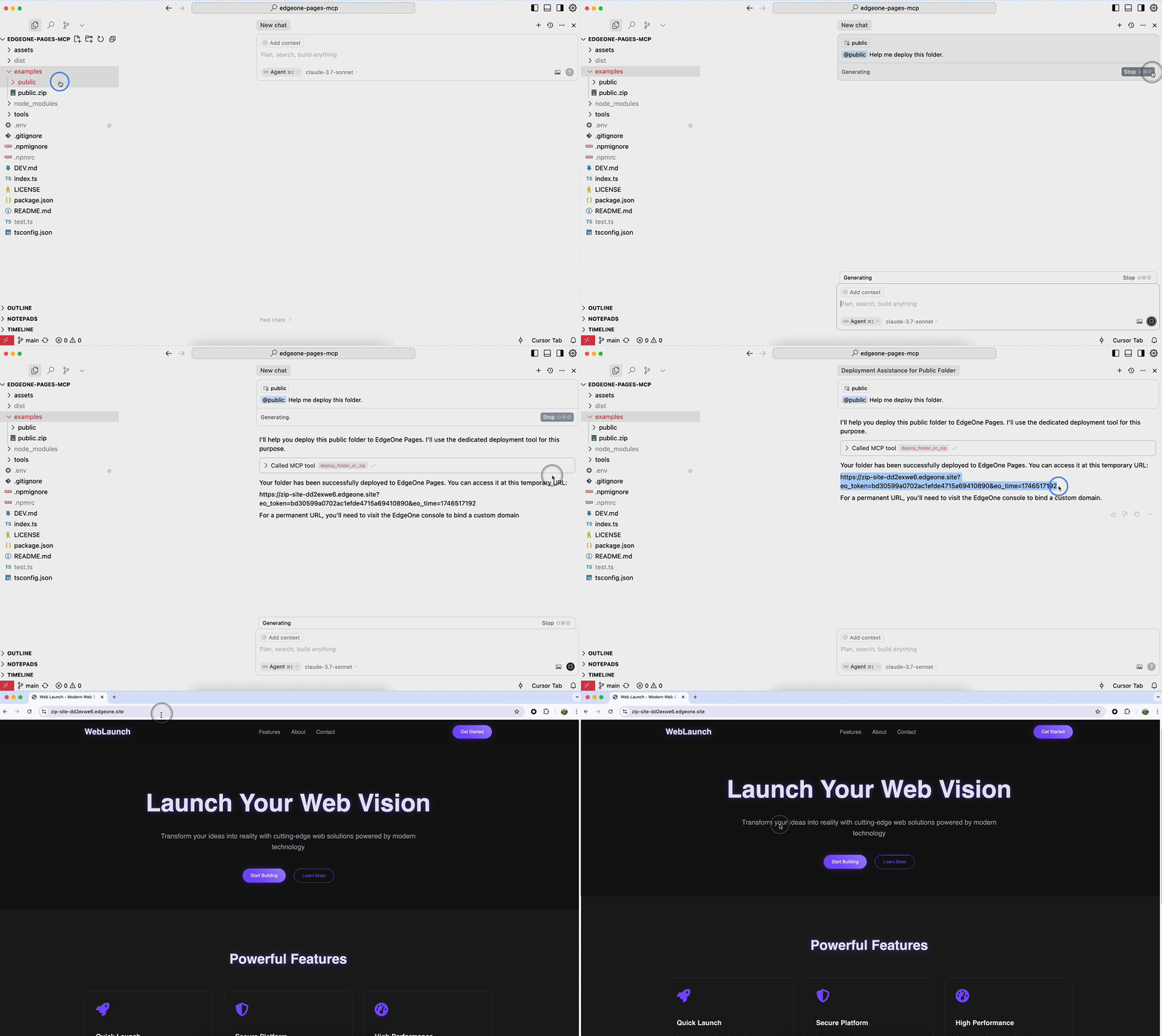
Requirements
- Node.js 18 or higher
MCP Configuration
stdio MCP Server
Full-featured MCP service that supports the deploy_folder tool for deploying full-stack projects.
// Tencent Cloud International (Default)
{
  "mcpServers": {
    "edgeone-pages-mcp-server": {
      "timeout": 600,
      "command": "npx",
      "args": ["edgeone-pages-mcp-fullstack@latest"]
    }
  }
}

// Tencent Cloud China
{
  "mcpServers": {
    "edgeone-pages-mcp-server": {
      "timeout": 600,
      "command": "npx",
      "args": ["edgeone-pages-mcp-fullstack@latest", "--region", "china"]
    }
  }
}
The following MCP Server will be deprecated soon:
Supports both deploy_html and deploy_folder_or_zip tools.
{
  "mcpServers": {
    "edgeone-pages-mcp-server": {
      "command": "npx",
      "args": ["edgeone-pages-mcp@latest"],
      "env": {
        // Optional.
        // If you need to deploy folders or zip files to
        // EdgeOne Pages projects, provide your EdgeOne Pages API token.
        // How to obtain your API token:
        // https://edgeone.ai/document/177158578324279296
        "EDGEONE_PAGES_API_TOKEN": "",
        // Optional. Leave empty to create a new EdgeOne Pages project.
        // Provide a project name to update an existing project.
        "EDGEONE_PAGES_PROJECT_NAME": ""
      }
    }
  }
}
Streaming HTTP MCP Server
For MCP clients that support HTTP streaming, only supports the deploy_html tool.
{
  "mcpServers": {
    "edgeone-pages-mcp-server": {
      "url": "https://mcp-on-edge.edgeone.site/mcp-server"
    }
  }
}
Tool Details
deploy_html Tool
Architecture Design

The architecture diagram shows the complete workflow of the deploy_html tool:
- Large Language Model generates HTML content
- Content is sent to the EdgeOne Pages MCP Server
- MCP Server deploys the content to EdgeOne Pages Edge Functions
- Content is stored in EdgeOne KV Store for fast edge access
- MCP Server returns a publicly accessible URL
- Users can access the deployed content via browser with fast edge delivery
Implementation Details
This tool integrates with EdgeOne Pages Functions to deploy static HTML content:
-
EdgeOne Pages Functions - A serverless computing platform that supports executing JavaScript/TypeScript code at the edge
-
Core Implementation Features:
- Uses EdgeOne Pages KV storage to save and serve HTML content
- Automatically generates publicly accessible URLs for each deployment
- Provides comprehensive API error handling and feedback
-
How It Works:
- MCP server receives HTML content through the
deploy_htmltool - Connects to EdgeOne Pages API to obtain the base URL
- Deploys HTML content using the EdgeOne Pages KV API
- Returns an immediately accessible public URL
- MCP server receives HTML content through the
For more information, refer to the EdgeOne Pages Functions documentation and EdgeOne Pages KV Storage Guide.
The source code is open source and can be self-deployed with custom domain binding: https://github.com/TencentEdgeOne/self-hosted-pages-mcp
deploy_folder Tool
This tool supports deploying complete projects to EdgeOne Pages:
- Supports full deployment of static website projects
- Supports deployment of full-stack applications
- Option to update existing projects or create new ones
License
MIT
EdgeOne Pages MCP Reviews
Login Required
Please log in to share your review and rating for this MCP.
Similar MCP Servers like EdgeOne Pages MCP
Explore related MCPs that share similar capabilities and solve comparable challenges
Aws Mcp Servers
Officialby awslabs
Provides specialized servers that expose AWS capabilities through the Model Context Protocol, enabling AI assistants to retrieve up-to-date documentation, execute API calls, and automate infrastructure workflows directly within development environments.
Cloudflare MCP Server
by cloudflare
Provides a collection of Model Context Protocol servers that enable MCP‑compatible clients to interact with Cloudflare services such as Workers, Observability, Radar, and more, allowing natural‑language driven management of configurations, data, and operations.
MCP Server Kubernetes
by Flux159
Connects to a Kubernetes cluster and offers a unified MCP interface for kubectl, Helm, port‑forwarding, diagnostics, and non‑destructive read‑only mode.
Run Model Context Protocol Servers With AWS Lambda
by awslabs
Wrap existing stdio‑based MCP servers to run as AWS Lambda functions, exposing them via HTTPS, API Gateway, Bedrock AgentCore, Lambda function URLs or the Lambda Invoke API.
Volcengine MCP Servers
by volcengine
A comprehensive collection of Model Context Protocol (MCP) servers that expose Volcengine cloud resources and third‑party services through natural‑language interfaces, enabling AI‑driven operations across compute, storage, databases, networking, security, and developer utilities.
AWS MCP Server
by rishikavikondala
Provides Model Context Protocol tools for performing AWS S3 and DynamoDB operations, with automatic logging and audit access via the `audit://aws-operations` endpoint.
Mcp Confluent
by confluentinc
Enables AI assistants to manage Confluent Cloud resources such as Kafka topics, connectors, and Flink SQL statements through natural‑language interactions.
Alibaba Cloud Ops MCP Server
Officialby aliyun
Enables AI assistants to operate Alibaba Cloud resources such as ECS, Cloud Monitor, OOS and other services through seamless integration with Alibaba Cloud APIs via the Model Context Protocol.
Sample MCP Server S3
by aws-samples
Retrieve PDF documents and other S3 objects through Model Context Protocol resources, enabling LLMs to pull data directly from AWS S3 buckets.