
Dbt Mcp Server
by
Provides a Model Context Protocol server that exposes a rich set of dbt‑related tools—SQL execution, semantic‑layer queries, discovery APIs, dbt CLI commands, admin operations, code generation, lineage analysis, and product documentation retrieval—so AI agents can safely interact with dbt projects and platforms.
Dbt Mcp Server Overview
What is Dbt Mcp Server about?
Dbt Mcp Server exposes dozens of remote‑procedure‑call style tools that let external agents query, modify, and manage dbt projects across Core, Fusion, and Platform environments. By bundling these capabilities behind the Model Context Protocol, developers can give LLM‑driven assistants direct, contextual access to model definitions, lineage, metrics, and warehouse operations.
How to use Dbt Mcp Server?
- Start the server (typically via the provided package’s CLI or container).
- Configure client credentials (API keys, tokens) as environment variables.
- Connect an LLM‑powered agent or any MCP‑aware client to the server endpoint.
- Invoke the desired tool by name and pass the required parameters; the server returns JSON‑encoded results.
The repository includes an experimental .mcpb bundle that can be imported by MCPB‑aware clients, simplifying setup: download the bundle from the latest release assets and install with Anthropic’s mcpb CLI.
Key features of Dbt Mcp Server
- SQL tooling: execute raw SQL and generate SQL from natural language with full semantic‑layer support.
- Semantic Layer queries: retrieve dimensions, metrics, compiled metric SQL, and run metric queries.
- Discovery API: list models, sources, macros, exposures, lineage graphs, health signals, performance history, and perform semantic search.
- dbt CLI façade: run classic dbt commands (
run,test,build,compile,list, etc.) remotely. - Admin API: manage job runs—trigger, cancel, retry, inspect artifacts, and list projects/jobs.
- Codegen utilities: auto‑generate model YAML, source YAML, and staging model SQL.
- dbt LSP tools: compile SQL and trace column‑level lineage via Fusion or local LSP.
- Product documentation access: fetch and search official dbt docs programmatically.
- Server metadata: query the running server’s git branch and version.
Use cases of Dbt Mcp Server
| Scenario | How Dbt Mcp Server helps |
|---|---|
| AI‑assisted data analysis | An LLM agent can retrieve model definitions, run metric queries, and execute ad‑hoc SQL to answer business questions in real time. |
| Automated CI/CD pipelines | CI jobs can invoke the server’s build, run, or test tools to validate changes without installing the full dbt CLI stack locally. |
| Self‑service data platform | End‑users interact via a chat interface that calls text_to_sql or get_dimension_values, shielding them from raw SQL writing. |
| Observability & governance | Ops teams query get_model_health, get_model_performance, and lineage graphs to monitor data quality and impact of changes. |
| Documentation generation | Bots can pull get_product_doc_pages or search_product_docs to enrich internal knowledge bases with up‑to‑date dbt docs. |
FAQ from the Dbt Mcp Server
-
Do I need a full dbt installation to run the server? No. The server bundles the required dbt runtime and can be started directly from the provided package or Docker image.
-
Can I restrict which tools an agent can call? Yes. Access control can be enforced at the API gateway or via custom authentication middleware that validates incoming method names.
-
Is the server safe for production use? The server is marked experimental; it is recommended for internal tooling and testing. Review the security considerations and restrict network exposure.
-
How do I update the server when a new dbt version is released? Pull the latest release assets (including the updated
.mcpbbundle) or upgrade the package via the standard package manager. -
What language is the server implemented in? The repository is primarily Python‑based, leveraging FastAPI to expose MCP endpoints.
Dbt Mcp Server's README
dbt MCP Server
This MCP (Model Context Protocol) server provides various tools to interact with dbt. You can use this MCP server to provide AI agents with context of your project in dbt Core, dbt Fusion, and dbt Platform.
Read our documentation here to learn more. This blog post provides more details for what is possible with the dbt MCP server.
Experimental MCP Bundle
We publish an experimental Model Context Protocol Bundle (dbt-mcp.mcpb) with each release so that MCPB-aware clients can import this server without additional setup. Download the bundle from the latest release assets and follow Anthropic's mcpb CLI docs to install or inspect it.
Feedback
If you have comments or questions, create a GitHub Issue or join us in the community Slack in the #tools-dbt-mcp channel.
Architecture
The dbt MCP server architecture allows for your agent to connect to a variety of tools.
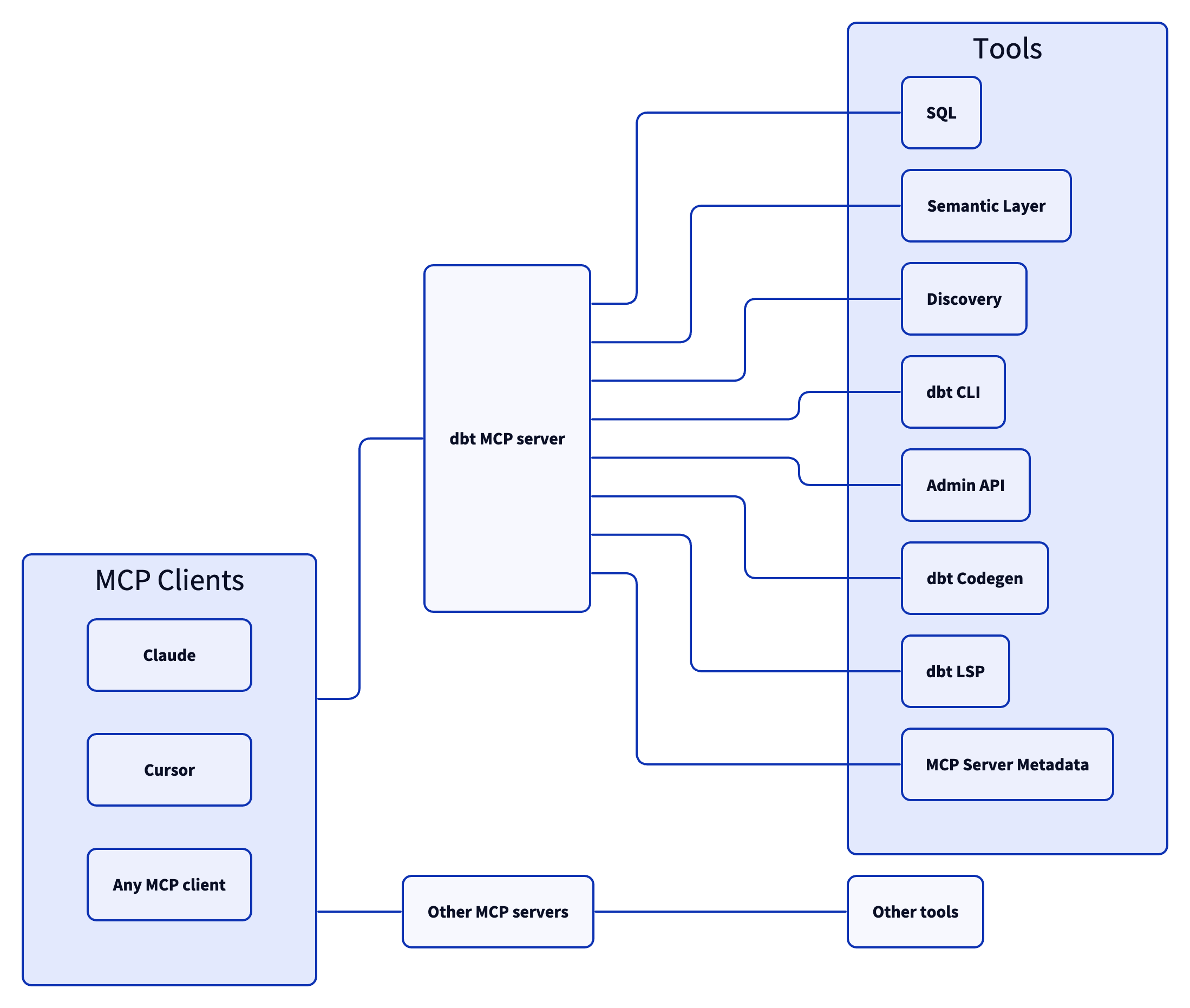
Tools
SQL
Tools for executing and generating SQL on dbt Platform infrastructure.
execute_sql: Executes SQL on dbt Platform infrastructure with Semantic Layer support.text_to_sql: Generates SQL from natural language using project context.
Semantic Layer
To learn more about the dbt Semantic Layer, click here.
get_dimension_values: Gets distinct values for a dimension; option to scope to specific metrics.get_dimensions: Gets dimensions for specified metrics.get_entities: Gets entities for specified metrics.get_metrics_compiled_sql: Returns compiled SQL for metrics without executing the query.list_metrics: Retrieves all defined metrics.list_saved_queries: Retrieves all saved queries.query_metrics: Executes metric queries with filtering and grouping options.
Discovery
To learn more about the dbt Discovery API, click here.
get_all_macros: Retrieves macros; option to filter by package or return package names only.get_all_models: Retrieves name and description of all models.get_all_sources: Gets all sources with freshness status; option to filter by source name.get_exposure_details: Gets exposure details including owner, parents, and freshness status.get_exposures: Gets all exposures (downstream dashboards, apps, or analyses).get_lineage: Gets full lineage graph (ancestors and descendants) with type and depth filtering.get_macro_details: Gets details for a specific macro.get_mart_models: Retrieves all mart models.get_model_children: Gets downstream dependents of a model.get_model_details: Gets model details including compiled SQL, columns, and schema.get_model_health: Gets health signals: run status, test results, and upstream source freshness.get_model_parents: Gets upstream dependencies of a model.get_model_performance: Gets execution history for a model; option to include test results.get_related_models: Finds similar models using semantic search.get_seed_details: Gets details for a specific seed.get_semantic_model_details: Gets details for a specific semantic model.get_snapshot_details: Gets details for a specific snapshot.get_source_details: Gets source details including columns and freshness.get_test_details: Gets details for a specific test.search: [Alpha] Searches for resources across the dbt project (not generally available).
dbt CLI
Allowing your client to utilize dbt commands through the MCP tooling could modify your data models, sources, and warehouse objects. Proceed only if you trust the client and understand the potential impact.
build: Executes models, tests, snapshots, and seeds in DAG order.clone: Clones selected nodes from the specified state to the target schema(s).compile: Generates executable SQL from models/tests/analyses; useful for validating Jinja logic.docs: Generates documentation for the dbt project.get_lineage_dev: Retrieves lineage from local manifest.json with type and depth filtering.get_node_details_dev: Retrieves node details from local manifest.json (models, seeds, snapshots, sources).list: Lists resources in the dbt project by type with selector support.parse: Parses and validates project files for syntax correctness.run: Executes models to materialize them in the database.show: Executes SQL against the database and returns results.test: Runs tests to validate data and model integrity.
Admin API
To learn more about the dbt Administrative API, click here.
cancel_job_run: Cancels a running job.get_job_details: Gets job configuration including triggers, schedule, and dbt commands.get_job_run_details: Gets run details including status, timing, steps, and artifacts.get_job_run_error: Gets error and/or warning details for a job run; option to include or show warnings only.list_job_run_artifacts: Lists available artifacts from a job run.list_jobs: Lists jobs in a dbt Platform account; option to filter by project or environment.list_jobs_runs: Lists job runs; option to filter by job, status, or order by field.list_projects: Lists all projects in the dbt Platform account.retry_job_run: Retries a failed job run.trigger_job_run: Triggers a job run; option to override git branch, schema, or other settings.
dbt Codegen
These tools help automate boilerplate code generation for dbt project files.
generate_model_yaml: Generates model YAML with columns; option to inherit upstream descriptions.generate_source: Generates source YAML by introspecting database schemas; option to include columns.generate_staging_model: Generates staging model SQL from a source table.
dbt LSP
A set of tools that leverage the Fusion engine for advanced SQL compilation and column-level lineage analysis.
fusion.compile_sql: Compiles SQL in project context via dbt Platform.fusion.get_column_lineage: Traces column-level lineage via dbt Platform.get_column_lineage: Traces column-level lineage locally (requires dbt-lsp via dbt Labs VSCE).
Product Docs
Tools for searching and fetching content from the official dbt documentation at docs.getdbt.com.
get_product_doc_pages: Fetches the full Markdown content of one or more docs.getdbt.com pages by path or URL.search_product_docs: Searches docs.getdbt.com for pages matching a query; returns titles, URLs, and descriptions ranked by relevance. Use get_product_doc_pages to fetch full content.
MCP Server Metadata
These tools provide information about the MCP server itself.
get_mcp_server_branch: Returns the current git branch of the running dbt MCP server.get_mcp_server_version: Returns the current version of the dbt MCP server.
Examples
Commonly, you will connect the dbt MCP server to an agent product like Claude or Cursor. However, if you are interested in creating your own agent, check out the examples directory for how to get started.
Dependencies
Dependencies are pinned to specific versions and are not updated automatically. Only security-related dependency updates are submitted via automated pull requests.
Contributing
Read CONTRIBUTING.md for instructions on how to get involved!
Dbt Mcp Server Reviews
Login Required
Please log in to share your review and rating for this MCP.
Similar MCP Servers like Dbt Mcp Server
Explore related MCPs that share similar capabilities and solve comparable challenges
MindsDB
Officialby mindsdb
Enables humans, AI agents, and applications to retrieve highly accurate answers across large‑scale data sources, unifying heterogeneous databases, warehouses, and SaaS platforms.
Vizro
by mckinsey
Build high-quality data visualization apps quickly using a low-code toolkit that leverages Plotly, Dash, and Pydantic.
MCP Server Chart
by antvis
Offers over 25 AntV chart types for automated chart generation and data analysis, callable via MCP tools, CLI, HTTP, SSE, or streamable transports.
Mcp Server Data Exploration
by reading-plus-ai
A versatile tool that enables interactive data exploration through prompts, CSV loading, and script execution.
Wren Engine
by Canner
Provides a semantic engine that lets MCP clients and AI agents query enterprise data with contextual understanding, precise calculations, and built‑in governance.
Google Analytics MCP Server
by surendranb
Provides natural‑language access to Google Analytics 4 data via MCP, exposing over 200 dimensions and metrics for Claude, Cursor and other compatible clients.
OpenAnalytics
by OpenLabs-so
Provides privacy‑first, cookieless web analytics with revenue attribution and an MCP server, enabling self‑hosted tracking without cookies or cross‑site identifiers.
BigQuery MCP Server
by ergut
Provides secure, read‑only access to BigQuery datasets, allowing large language models to query and analyze data through a standardized interface.
Mcp Vegalite Server
by isaacwasserman
Provides an interface for LLMs to visualize data using Vega‑Lite syntax, supporting saving of data tables and rendering visualizations as either a full Vega‑Lite specification (text) or a base64‑encoded PNG image.